See where your group is, all trip long.
StayTogether is a free app. On a school trip, students share their phone's location with the trip's chaperones from start to end, and sharing turns off by itself. Open the app any time to see where each student last was, whether they're walking between the hotel and the conference center or exploring in small groups.
- No accounts
- No location history
- No ads
StayTogether helps chaperones keep a group together during free time. It does not replace adult supervision, chaperone judgment, or your organization's policies. Phone location can be delayed or inaccurate.

Sharing lasts as long as the trip does.
A trip might be fifty students and a few chaperones over several days. Students share their location the whole time, so the adults can check the map at any point in the day. When students spread out at a mall, a theme park, or a museum, the trip lead starts free time and sets an area to stay inside.
Trip leads and chaperones
The trip lead, usually a teacher, advisor, or director, sets up the trip on their phone with a name, the dates, and the roster, and approves each chaperone's phone. After that, any of you can open the app to see the map and the list, with the students who need attention at the top. Nobody creates an account.
Students
Students are 13 or older. They join from a link, enter their birth month and year, tap their name, and allow location. Their home screen shows that sharing is on, who can see it, and when it ends. They can stop sharing, and they can't see each other's locations.
Three steps, all on your phone.
Start a trip
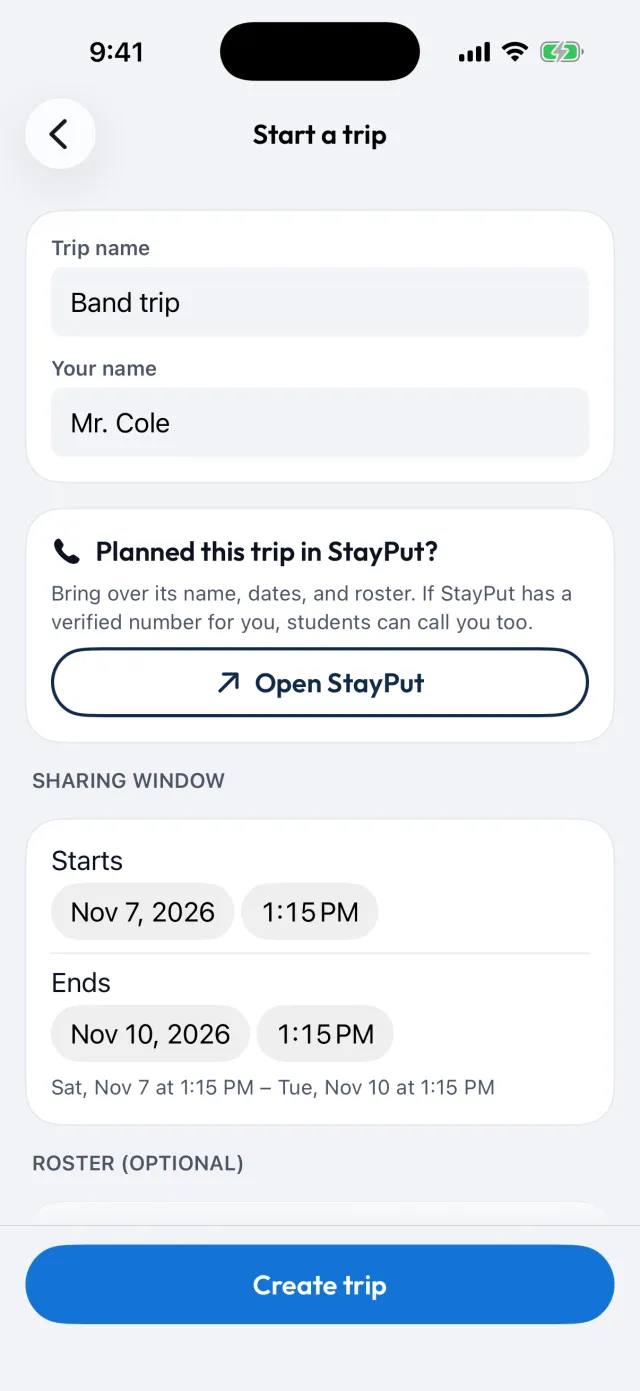
Name the trip, set its start and end, and paste in your roster. Nobody needs an account or a password.
Share one link
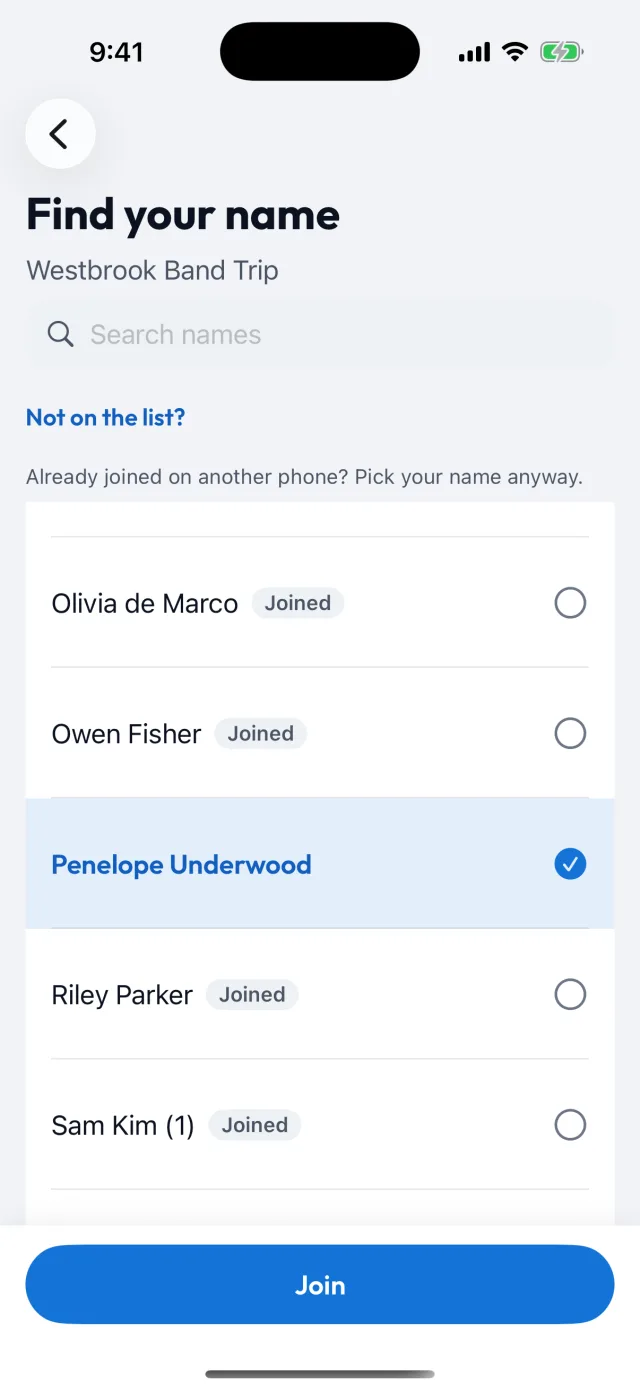
Students tap the link (or type the 6-character code), tap their name, and allow location. Their phone shares from the trip's start to its end. Chaperones use a separate code, and the trip lead approves each chaperone's phone.
Start free time
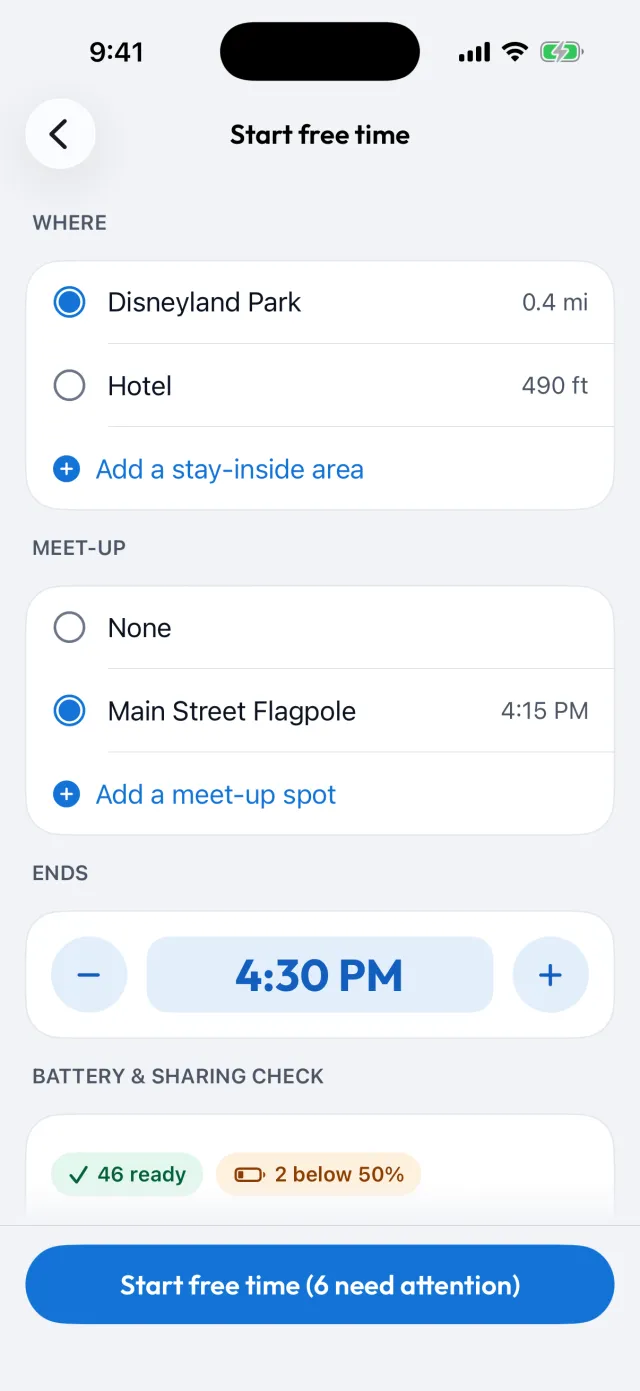
When students head off on their own, start free time: pick the area to stay inside, a meet-up spot if you want one, and an end time. Before anyone leaves, you see who is ready and whose battery is low.
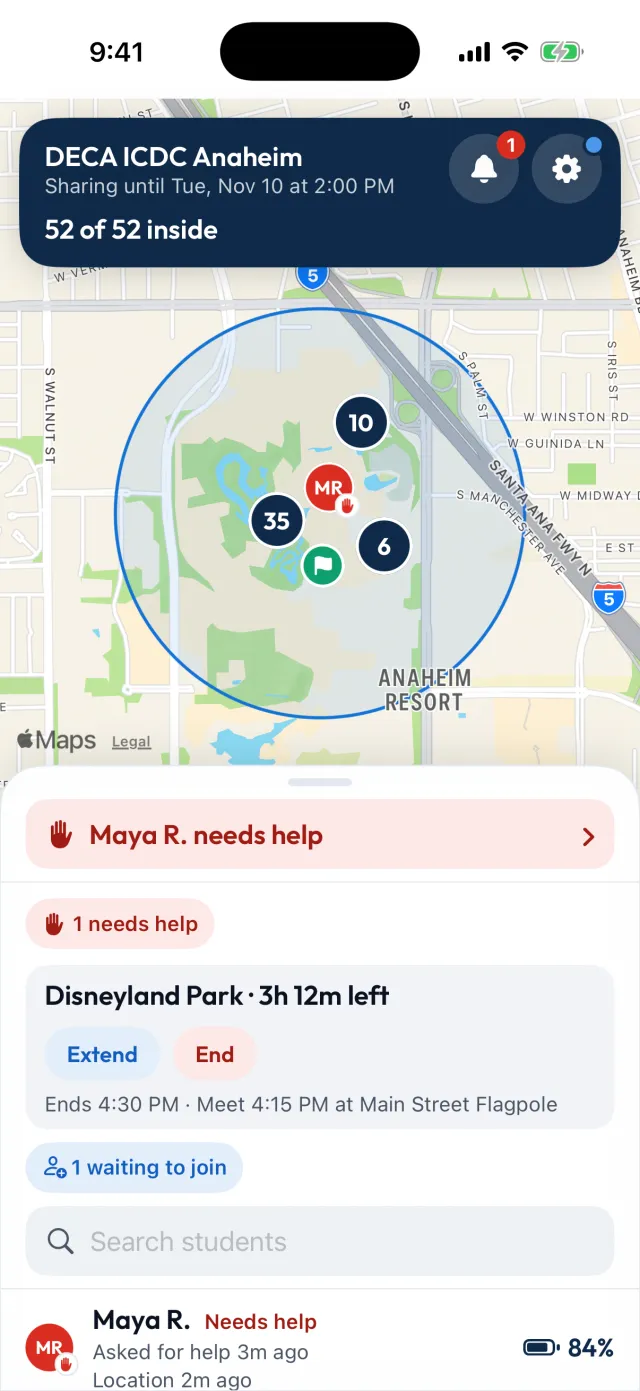
The whole group on a map, and who needs you first.
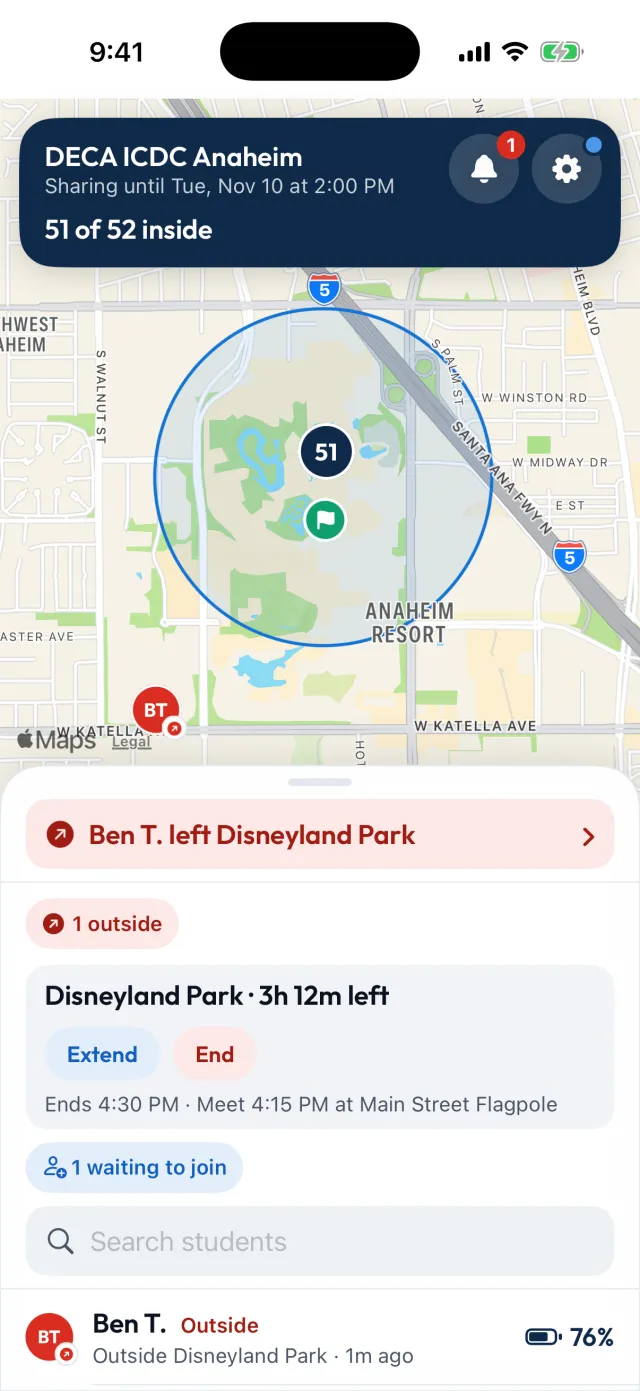
- The map. Each student is a small icon with their initials. Students standing close together merge into a numbered bubble. Anyone who needs attention stays separate, so you can spot them.
- The count. During free time the top of the screen reads "52 of 52 inside". The rest of the trip it shows how many students are sharing. Students who need attention are listed first, with the reason next to each name.
- Battery. Each student's battery level is on their row. You choose the level students should have before they head out, and the level you want an alert for.
- How old a location is. Every location shows when the phone last reported it. A phone that has stopped updating is shown as "location unknown", so it is not counted as inside.
- The meet-up. Near meet-up time you see how far away each student is, and you check them off as they arrive.
Six alerts for chaperones
- A student asked for helpAll trip
- A student stopped sharingAll trip
- Someone left the stay-inside areaFree time
- A battery dropped below your alert levelFree time
- A phone stopped updatingFree time
- Someone isn't at the meet-up on timeFree time
See who said "I'm on it"
Each alert shows which chaperone has taken it. Two adults don't head for the same student, and you can see when no one has taken one yet.
Push notifications
Alerts arrive as push notifications. StayTogether sends no texts and no marketing messages. Area, battery, and "not updating" alerts run only during free time, so a phone charging overnight does not set them off.
A push notification depends on the phone's settings and connection. It can arrive late, or not at all. Check the app during free time, and keep counting in person.
StayTogether helps chaperones keep a group together during free time. It does not replace adult supervision, chaperone judgment, or your organization's policies. Phone location can be delayed or inaccurate.
On for the trip, off when it's over.
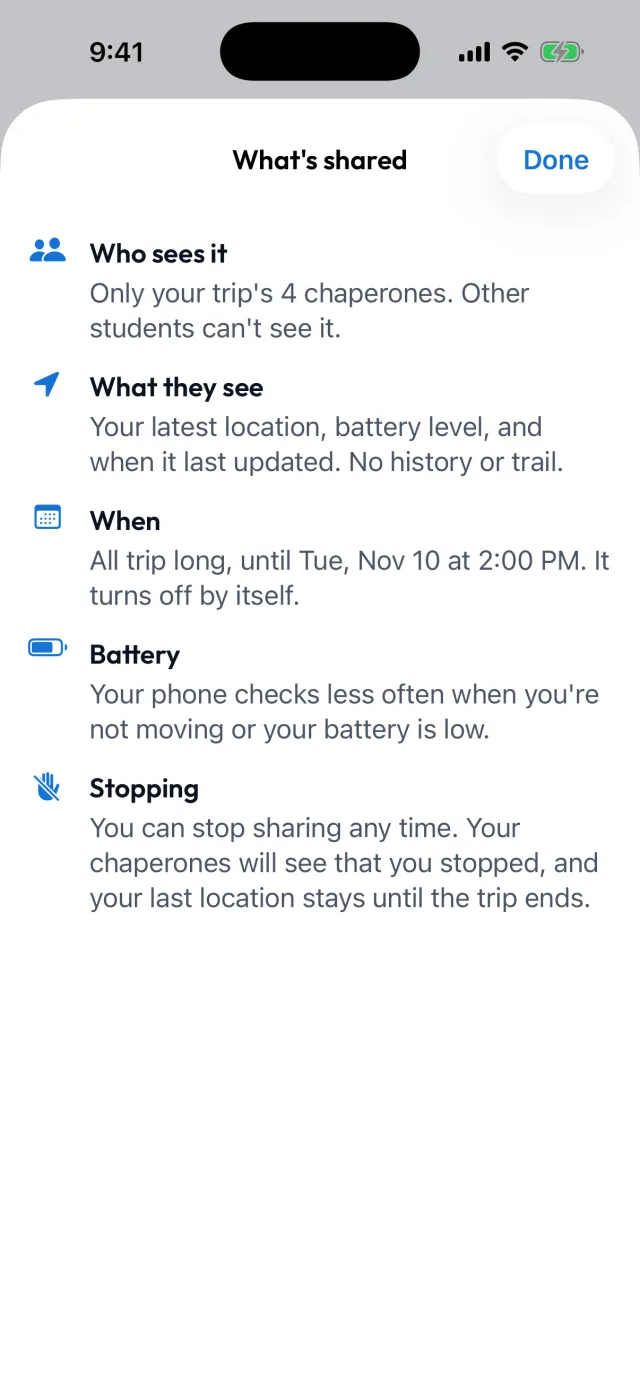
Students share their location with their trip's chaperones only between the trip's dates. Students can see that sharing is on, and it turns off by itself at the end.
Sharing covers the whole trip, day and night, including overnight on a longer trip. It is not limited to free time.
- Only the trip's approved chaperones see it in the app. The trip lead approves each chaperone's phone. Chaperone screens open only after Face ID, a fingerprint, or the phone's passcode. Students cannot see each other's locations.
- No route history or replay. The service keeps each student's latest reported location and replaces it when a new one arrives. Trip alerts, such as "left the area" with the time, stay with the trip until the trip is deleted.
- It ends by itself. Sharing stops at the trip's end. Locations and battery readings are cleared from the service then. The rest of the trip's data (names, alerts, codes) is deleted from the service 30 days after the trip ends. An ended trip cannot be reopened.
- Students can stop. While sharing is on, "Stop sharing" sits on the student's home screen. The phone stops sending new locations, and chaperones are told once the phone has a connection. Chaperones can still see the last location the phone reported, until the trip ends.
- No accounts, no ads, and no selling or renting data. Data is not used for advertising, and it is not shared with advertisers or data brokers. Students join with their first and last name, with no email address and no password.

Free, from the team that makes StayPut.
Nobody pays for StayTogether. There are no ads, and we do not sell data.
We also make StayPut, which watches hotel-room doors on overnight school trips. If StayTogether helps on your trip, we hope you will think of StayPut for an overnight one.
Two separate products
StayTogether shares students' phone location with their trip's chaperones, between the trip's dates.
StayPut, the door product, watches hotel-room doors. It collects no student location.
StayTogether sends no location, battery, or status to StayPut. Details move the other way only when a trip lead chooses to bring their own trip over, and then only information about that trip, such as its name and dates, the places in its plan, students' names, and the lead's name and verified phone number.
Frequently asked questions
Is it really free?
Yes. Nobody pays for it, there are no ads, and we do not sell data. It is made by StayPut, LLC, the company behind StayPut.
Does anyone need an account?
No. Students join with the trip's link or 6-character code and tap their name. Chaperones use a separate code, and the trip lead approves each chaperone's phone.
What can chaperones see?
Each student's latest reported location, battery level, and when each last updated. There is no route history and no replay. Chaperones also see check-ins, help requests, trip alerts (such as "left the area", with the time), and whether a student has stopped sharing or limited location access.
Can students see each other? Can parents?
No. In the app, only the trip's approved chaperones see student locations. Students see their own status, and there is no parent view. Behind the app, StayPut, LLC staff can reach trip data only to run and support the service, and the companies that host it handle it for us. The privacy policy lists them.
When does sharing start and stop?
Only between the trip's start and end, which the trip lead sets (up to 30 days apart). In between, sharing is on day and night, including overnight. It is not limited to free time. Once a trip has started, its start cannot change. Its end can move earlier, or later by up to 24 hours in total. Students are sent a notification about a new end time, and their home screen shows it. At the end, sharing turns off by itself, each student's last location and battery level are cleared from the service, and the trip cannot be reopened.
Can a student stop sharing?
Yes. The "Stop sharing" button is on their home screen, and "Resume sharing" brings it back. The phone stops sending new locations. The choice is saved on the phone, so sharing stays off if the phone restarts. Chaperones are told once the phone has a connection. They can still see the last location the phone reported, until the trip ends.
How old do students need to be?
13 or older. The app asks each student for their birth month and year when they join. Students under 13 cannot join, so trip leads should leave them off the roster.
What does it do to a student's battery?
The app checks location less often when a phone is still or its battery is low. It uses precise location during free time unless the battery is low, and less precise location the rest of the trip. We have not published battery measurements yet. Battery use depends on the phone and how it is used.
How is this different from a family location app?
Family apps are for a few people who share with each other all the time. StayTogether is for one school group on one trip: a map that stays readable with fifty students on it, alerts for the whole group, no accounts, and sharing that ends by itself when the trip does.
Which phones does it work on?
iPhones with iOS 17 or later, and Android phones with Android 10 or later. Trips run in the app. There is no web dashboard.
How are StayTogether and StayPut related?
Both come from StayPut, LLC, and they are separate products with separate data. StayTogether shares location with a trip's chaperones. StayPut watches hotel-room doors and collects no student location. StayTogether sends no location, battery, or status to StayPut. Details move the other way only when a trip lead brings their own trip over.
Does this replace supervision?
No. StayTogether helps chaperones keep a group together during free time. It does not replace adult supervision, chaperone judgment, or your organization's policies. Phone location can be delayed or inaccurate.
Get StayTogether
Free on iPhone and Android.
StayTogether isn't in the app stores yet. Questions in the meantime: support@getstaytogether.com